Documentation Index
Fetch the complete documentation index at: https://sequence-0fb8d9e6-api_docs.mintlify.app/llms.txt
Use this file to discover all available pages before exploring further.
Import
import { useCreateListingModal } from "@0xsequence/marketplace-sdk/react";
Usage
Make sure you have followed the Getting
Started guide
to get the collection address and chainId.
Examples
Basic Listing Creation
Inventory Listing
Example of implementing a basic listing creation using the useCreateListingModal hook:export default function BasicListingExample() {
const { address: accountAddress } = useAccount();
const { data: marketplaceConfig, isLoading: isMarketplaceConfigLoading } =
useMarketplaceConfig();
const collection = marketplaceConfig?.market.collections[0];
const chainId = collection?.chainId as number;
const collectionAddress = collection?.itemsAddress as Address;
const collectibleId = '0';
const orderbookKind = OrderbookKind.sequence_marketplace_v2;
// Get collectible metadata
const {
data: collectible,
isLoading: isLoadingCollectible,
isError: isErrorCollectible,
} = useCollectible({
chainId,
collectionAddress,
collectibleId,
});
// Check if user owns the collectible
const {
data: balance,
isLoading: isLoadingBalance,
isError: isErrorBalance,
} = useBalanceOfCollectible({
collectionAddress,
collectableId: collectibleId,
userAddress: accountAddress as Address,
chainId,
query: {
enabled: !!accountAddress,
},
});
const { show: showCreateListingModal } = useCreateListingModal({
onSuccess: ({ hash, orderId }) => {
console.log('Listing created successfully', { hash, orderId });
},
onError: (error) => {
console.error('Listing creation failed:', error.message);
},
});
const handleCreateListing = () => {
if (!collectible || !balance || Number(balance) === 0) return;
showCreateListingModal({
chainId,
collectionAddress,
collectibleId,
orderbookKind,
});
};
const isOwner = balance && Number(balance) > 0;
const isLoading = isLoadingCollectible || isLoadingBalance;
const hasError = isErrorCollectible || isErrorBalance;
return (
<div style={{ padding: '20px' }}>
<h3>Create Listing</h3>
{collectible && (
<div style={{ marginBottom: '16px' }}>
<p>Name: {collectible.name}</p>
<p>Collectible ID: {collectibleId}</p>
<p>Owned: {balance?.balance || '0'}</p>
</div>
)}
<button
type="button"
onClick={handleCreateListing}
disabled={isLoading || hasError || !isOwner || !accountAddress}
style={{
backgroundColor: isOwner ? '#007bff' : '#6c757d',
color: 'white',
border: 'none',
padding: '12px 24px',
borderRadius: '8px',
cursor: isOwner ? 'pointer' : 'not-allowed',
}}
>
{isLoading
? 'Loading...'
: !accountAddress
? 'Connect Wallet'
: !isOwner
? "You don't own this collectible"
: 'Create Listing'}
</button>
</div>
);
}
Example of implementing listing creation from a user’s inventory:This example demonstrates how to integrate the listing modal with inventory management, allowing users to list collectibles they own.
export default function InventoryListingExample() {
const { address: accountAddress } = useAccount();
const { data: marketplaceConfig, isLoading: isMarketplaceConfigLoading } =
useMarketplaceConfig();
const collection = marketplaceConfig?.market.collections[0];
const chainId = collection?.chainId as number;
const collectionAddress = collection?.itemsAddress as Address;
const orderbookKind = OrderbookKind.sequence_marketplace_v2;
// Get user's inventory for this collection
const {
data: inventoryData,
isLoading: isLoadingInventory,
error: inventoryError,
} = useInventory({
accountAddress: accountAddress as Address,
collectionAddress,
chainId,
query: {
enabled: !!accountAddress,
},
});
const { show: showCreateListingModal } = useCreateListingModal({
onSuccess: ({ hash, orderId }) => {
console.log('Listing created successfully', { hash, orderId });
// Optionally refetch inventory to update UI
},
onError: (error) => {
console.error('Failed to create listing:', error.message);
},
successActionButtons: [
{
label: 'View Listing',
action: () => {
// Navigate to listing or marketplace
console.log('Navigate to listing');
},
},
],
});
const handleListCollectible = (tokenId: string) => {
showCreateListingModal({
chainId,
collectionAddress,
collectibleId: tokenId,
orderbookKind,
});
};
if (isLoadingInventory) {
return <div>Loading inventory...</div>;
}
if (inventoryError) {
return <div>Error loading inventory: {inventoryError.message}</div>;
}
if (!inventoryData?.collectibles?.length) {
return <div>No collectibles found in your inventory</div>;
}
return (
<div style={{ padding: '20px' }}>
<h3>Your Collection - Create Listings</h3>
<div
style={{
display: 'grid',
gridTemplateColumns: 'repeat(auto-fill, minmax(250px, 1fr))',
gap: '16px',
}}
>
{inventoryData.collectibles.map((collectible) => (
<div
key={collectible.metadata.tokenId}
style={{
border: '1px solid #e0e0e0',
borderRadius: '8px',
padding: '16px',
textAlign: 'center',
}}
>
{collectible.metadata.image && (
<img
src={collectible.metadata.image}
alt={collectible.metadata.name}
style={{
width: '100%',
height: '200px',
objectFit: 'cover',
borderRadius: '4px',
}}
/>
)}
<h4>{collectible.metadata.name}</h4>
<p>Collectible ID: {collectible.metadata.tokenId}</p>
<p>Balance: {collectible.balance}</p>
<button
type="button"
onClick={() =>
handleListCollectible(collectible.metadata.tokenId)
}
style={{
backgroundColor: '#28a745',
color: 'white',
border: 'none',
padding: '8px 16px',
borderRadius: '4px',
cursor: 'pointer',
marginTop: '8px',
}}
>
Create Listing
</button>
</div>
))}
</div>
</div>
);
}
Parameters
The hook accepts an optional callbacks object with the following properties:
interface ModalCallbacks {
onSuccess?: ({ hash, orderId }: { hash?: Hash; orderId?: string }) => void;
onError?: (error: Error) => void;
successActionButtons?: Array<{ label: string; action: () => void }>;
}
| Parameter | Type | Description |
callbacks.onSuccess | ({ hash, orderId }: { hash?: Hash; orderId?: string }) => void | Optional callback function called when the listing is created successfully |
callbacks.onError | (error: Error) => void | Optional callback function called when an error occurs during listing creation |
callbacks.successActionButtons | Array<{ label: string; action: () => void }> | Optional array of action buttons to show on success |
Return Type
The hook returns an object with the following methods:
{
show: (args: ShowCreateListingModalArgs) => void
close: () => void
}
Methods
show
(args: ShowCreateListingModalArgs) => void
Opens the create listing modal with the specified parameters.
interface ShowCreateListingModalArgs {
collectionAddress: Address;
chainId: number;
collectibleId: string;
orderbookKind?: OrderbookKind;
}
| Parameter | Type | Required | Description |
collectionAddress | Address | Yes | The contract address of the collection |
chainId | number | Yes | The blockchain network ID (e.g., 1 for Ethereum, 137 for Polygon) |
collectibleId | string | Yes | The collectible ID of the collectible to list |
orderbookKind | OrderbookKind | No | The orderbook type to use (defaults to sequence_marketplace_v2) |
close
() => void
Closes the create listing modal.
Notes
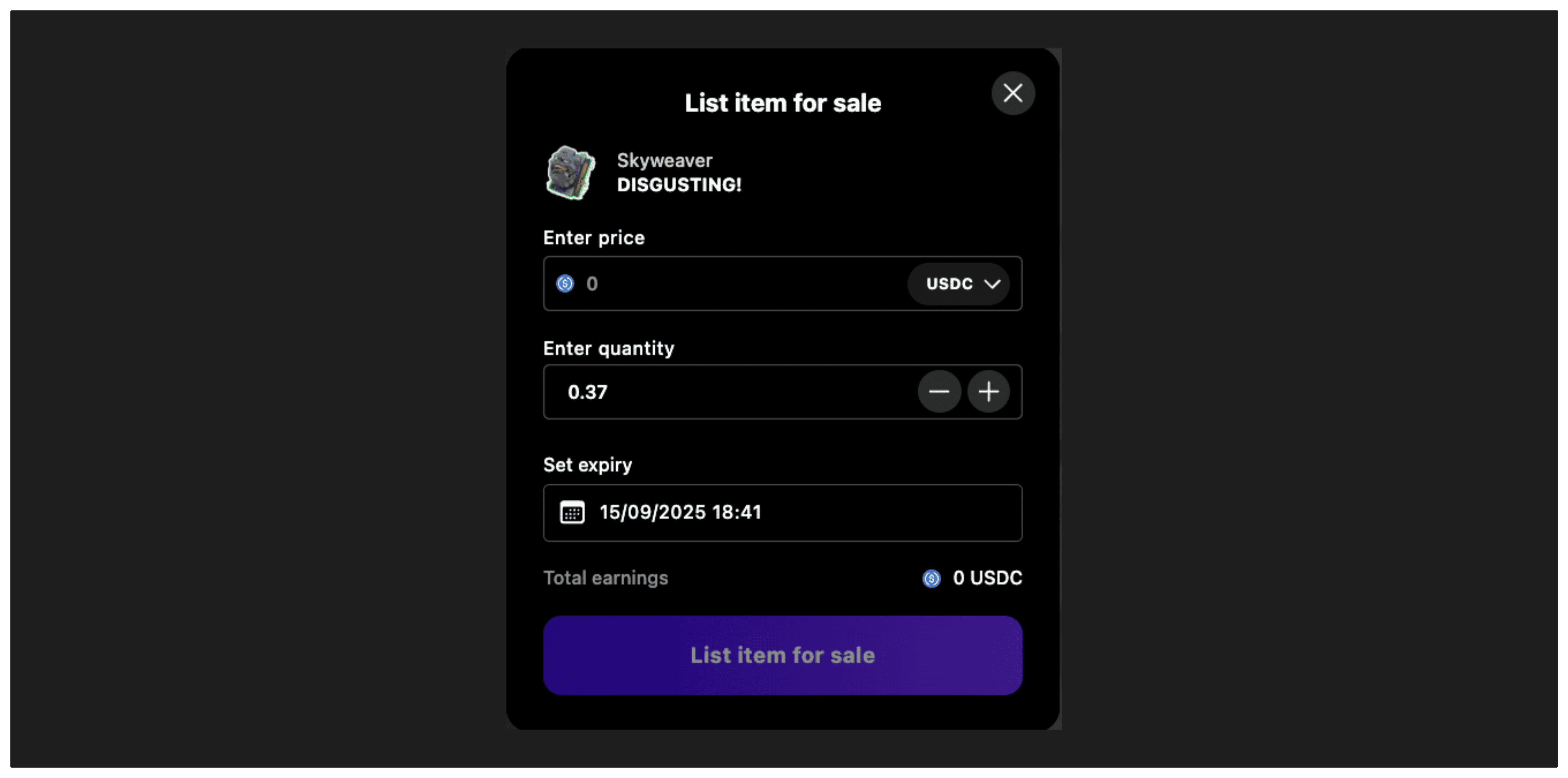
The useCreateListingModal hook provides a convenient way to manage the create listing modal interface for collectible sales. It handles:
- Opening and closing the modal
- Managing the listing creation flow state
- Price and quantity input validation
- Expiration date selection
- Error handling and success callbacks
- Transaction approval and execution steps
- Support for different orderbook types
Prerequisites
Before using this hook, ensure:
- User Authentication: The user must be connected with a wallet
- Ownership Verification: Use hooks like
useBalanceOfCollectible to verify the user owns the collectible
- Collectible Data: Use
useCollectible to get metadata for the collectible being listed
- Network Configuration: Ensure the marketplace is configured for the target chain